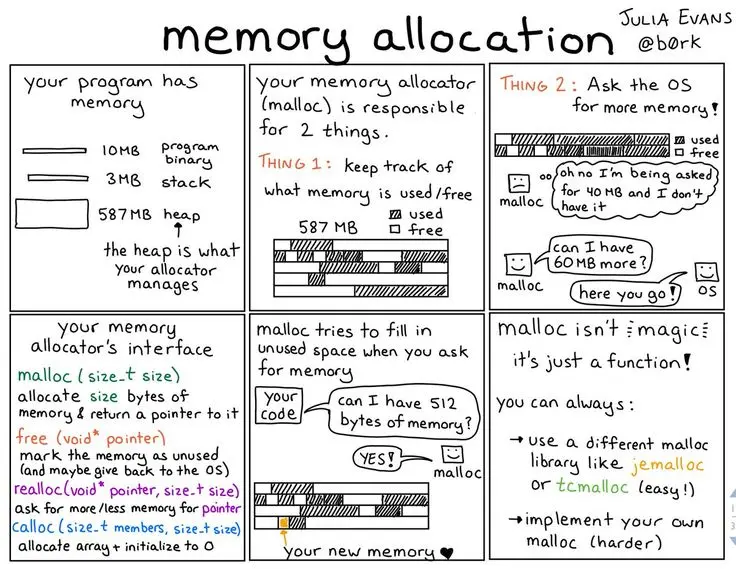
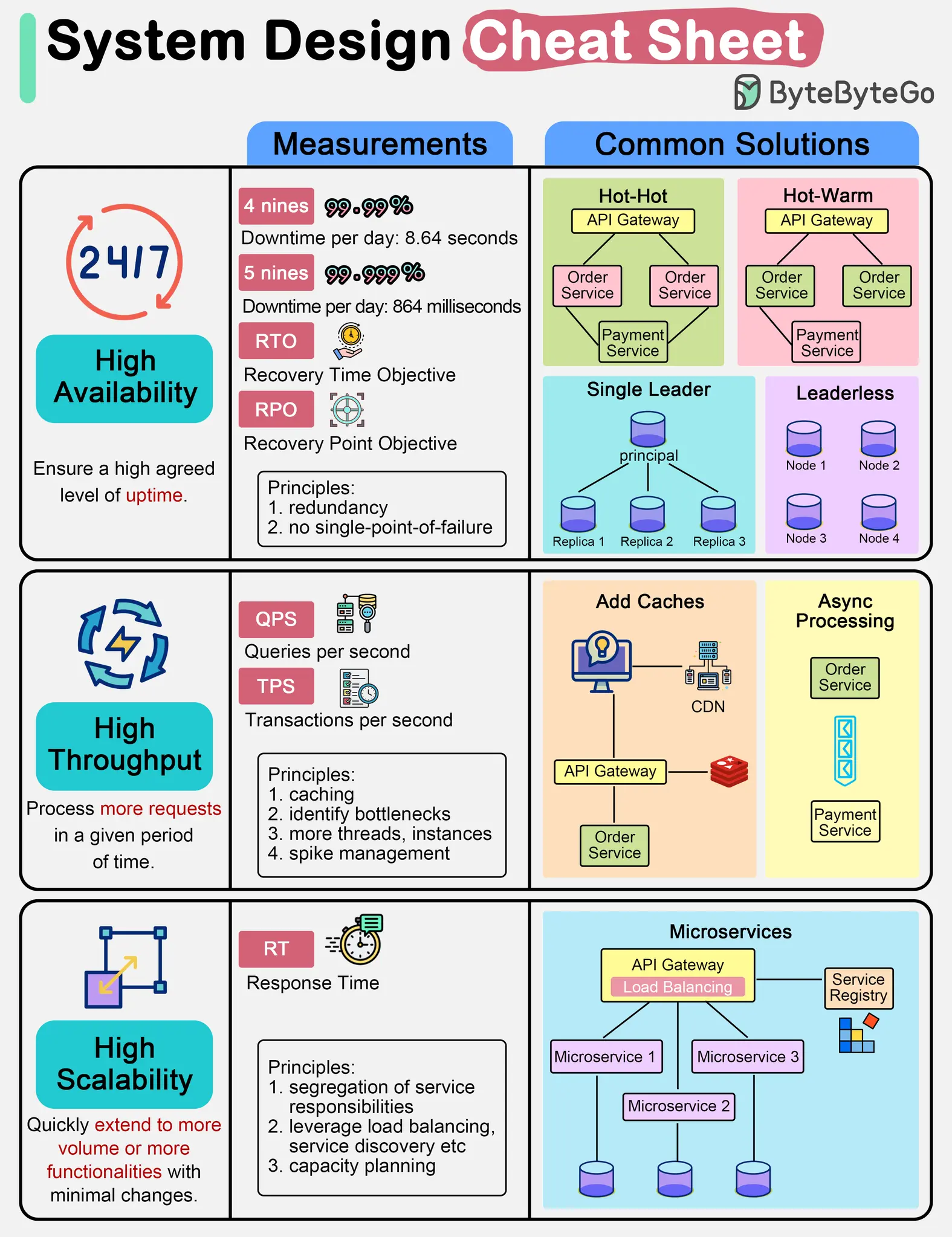
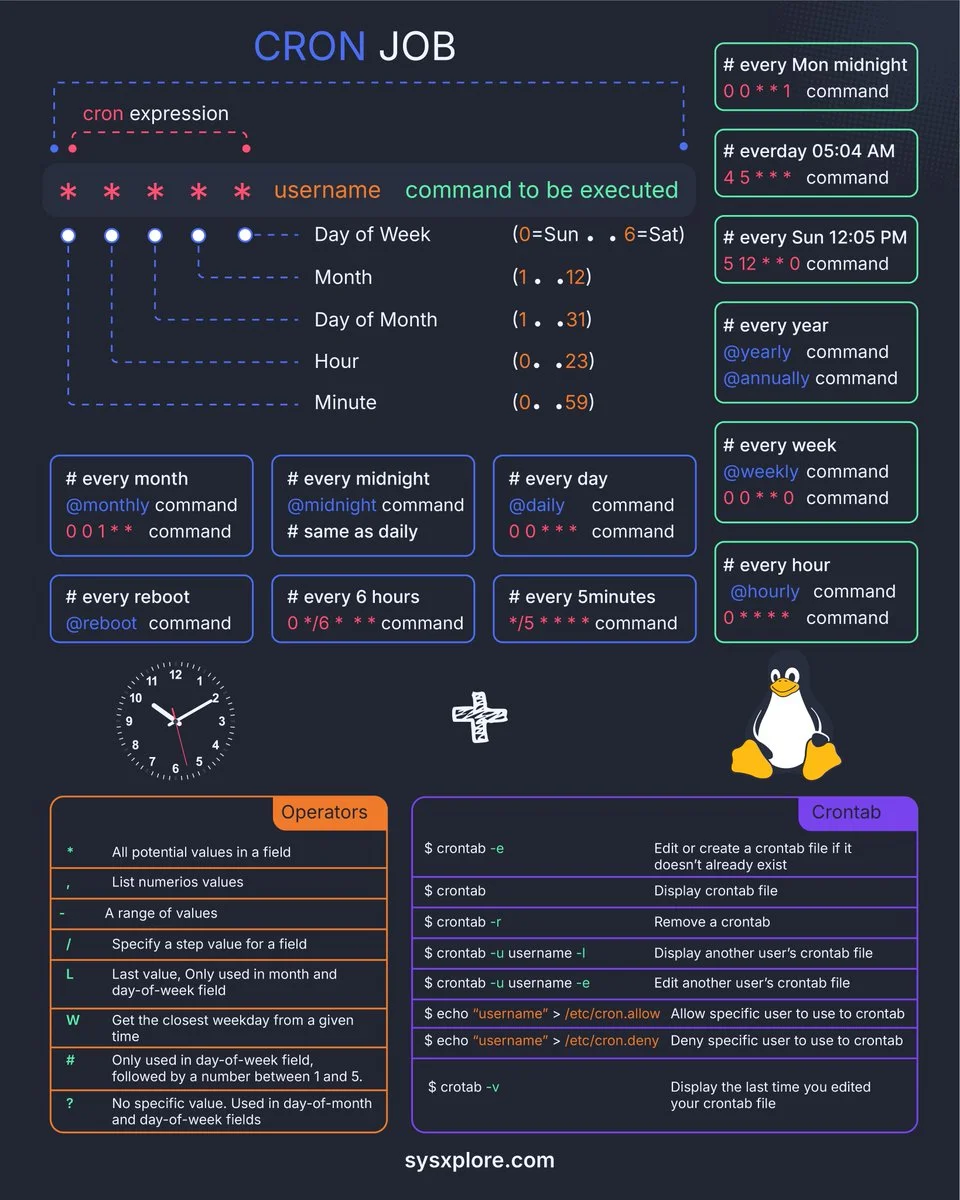
一图胜千言
1 - Git 实用技巧:如何将某个 Commit 导出为 Patch 补丁
在日常团队协作或跨仓库代码同步时,我们经常需要将某个特定的代码提交(Commit)提取出来,分享给他人或应用到另一个项目中。Git 提供了强大的 format-patch 工具,可以完美保留原提交的作者、时间、提交说明等元数据。 本文将为您介绍几种最常用的 Git 导出及应用 Patch 的场景。
1. 核心命令:导出单个特定 Commit
如果您知道某个 Commit 的哈希值(Commit ID),可以使用以下命令将其单独导出为一个 .patch 文件:
git format-patch -1 <commit-id>
参数说明:
:替换为您实际的提交哈希值(例如 abcd123)。 - -1:表示仅导出当前这一次提交。如果不加 -1,Git 会默认导出该 Commit 之后的所有提交。
2. 常见使用场景扩展## 导出最近一次提交 (HEAD)
如果您刚完成一次提交,想立刻将其转为补丁:
git format-patch -1 HEAD
批量导出区间内的多个提交
如果您想将 commit-A 到 commit-B 之间的所有修改打包(包含 B,不包含 A):
git format-patch <commit-A>..<commit-B>
规范输出:导出到指定文件夹
默认情况下,补丁文件会生成在当前目录下。如果提交较多,建议规范输出到特定目录:
git format-patch -1 <commit-id> -o /path/to/directory
3. 接收方如何应用 Patch?
拿到 .patch 文件后,接收方有两个命令可以选择,具体取决于是否需要保留提交历史记录:
方案 A:保留完整历史(推荐)
如果您希望在新的仓库里完美复现这个 Commit(包括原作者、提交时间和提交信息):
git am < 0001-xxx.patch
方案 B:仅应用代码修改(不留历史)
如果您只想把代码改动应用到当前工作区,后续自己重新填写 Commit 信息:
git apply < 0001-xxx.patch
总结
- 使用 git format-patch -1
快速提取单个补丁。 - 使用 git am 恢复补丁并完美保留提交日志。
2 - Gitignore 规则总结
Gitignore 文件用于指定 Git 应该忽略哪些文件和目录,不将它们纳入版本控制。
放置位置
- 项目根目录: 规则适用于整个仓库。
- 子目录: 规则适用于该子目录及其所有子目录。
规则语法
- 空行或以
#开头的行:被视为注释,会被忽略。# 这是一个注释 - 标准 glob 模式匹配:
*:匹配零个或多个字符。?:匹配一个任意字符。[]:匹配括号中任意一个字符。
- 匹配目录:在模式末尾添加斜杠
/来指定只匹配目录。temp/ # 忽略名为 temp 的目录及其所有内容 - 排除模式(否定):在模式前加
!来取消忽略。如果一个文件被前面的规则忽略了,但又被排除模式匹配,它将不被忽略。*.log # 忽略所有 .log 文件 !important.log # 但不忽略 important.log - 开头斜杠
/:将模式锚定到.gitignore文件所在的目录。如果.gitignore在项目根目录,则锚定到项目根目录。/build # 只忽略项目根目录下的 build 目录,不忽略 src/build - 双星号
**:**/:匹配任意深度的文件或目录。**/logs忽略任意目录下的logs目录。pattern/**:匹配指定目录下的所有文件和子目录。docs/**忽略docs目录下的所有文件和子目录。a/**/b:匹配a目录下的任意深度的b文件或目录。例如,a/b,a/x/b,a/x/y/b。
匹配顺序与优先级
- 后来居上:
.gitignore文件中后出现的规则会覆盖先出现的规则。 - 层级优先: 子目录中的
.gitignore文件中的规则会覆盖父目录中的.gitignore文件中的规则。 - 否定规则: 否定模式 (
!) 重新包含先前被忽略的文件。被!规则重新包含的文件不会再被同一个.gitignore文件中后续的规则排除。
注意事项
- 已跟踪文件: 一旦文件已经被 Git 跟踪(即已经提交过),
.gitignore规则将不再对其生效。你需要使用git rm --cached <file>命令从 Git 索引中移除该文件,然后 Git 才会开始忽略它。
示例
# 忽略所有 .log 文件
*.log

# 忽略根目录下的 build 目录
/build

# 忽略 node_modules 目录及其内容
node_modules/

# 忽略所有 temp 目录,无论深浅
**/temp/

# 忽略所有 .txt 文件,但保留 important.txt
*.txt
!important.txt
3 - GPG 开发者速查表
1. 密钥管理 (Key Management)
| 命令 | 说明 |
|---|---|
gpg -k | 列出所有公钥 |
gpg -K | 列出所有私钥(含 Keygrip) |
gpg -K --with-keygrip | 最常用:查看密钥 ID 及对应的 Keygrip |
gpg --import <file.asc> | 导入公钥/私钥 |
gpg -a --export <ID> | 导出 ASCII 格式公钥 |
2. 签名与验证 (Signing & Verification)
| 命令 | 说明 |
|---|---|
gpg -s file | 对文件进行签名(二进制) |
gpg -a -b file | 最常用:生成 ASCII 格式的独立签名文件(.asc) |
gpg --verify file.asc file | 验证签名 |
gpg --detach-sign -a file | 对文件进行分离式 ASCII 签名 |
3. 加密与解密 (Encryption & Decryption)
| 命令 | 说明 |
|---|---|
gpg -c file | 对称加密(仅密码,无需密钥对) |
gpg -e -r <ID> file | 使用特定公钥加密 |
gpg -d file.gpg | 解密文件 |
4. Agent 维护 (Troubleshooting)
这是解决 Magit/IDE 卡死的关键:
- 查看缓存状态:
gpg-connect-agent 'keyinfo --list' /bye - 重载 Agent (清缓存):
gpg-connect-agent reloadagent /bye - 手动预缓存密钥:
gpg-preset-passphrase --preset <KEYGRIP>(需在gpg-agent.conf中开启allow-preset-passphrase)
💡 核心配置文件参考
~/.gnupg/gpg-agent.conf:
# 确保使用 pinentry-mac (macOS) 或 pinentry-curses (Linux)
pinentry-program /opt/homebrew/bin/pinentry-mac

# 缓存设置 (秒)
default-cache-ttl 3600
max-cache-ttl 86400

# 允许预缓存
allow-preset-passphrase
🛠️ 建议 Alias (加入 .zshrc/.bashrc)
alias gpg-keys='gpg -K --with-keygrip'
alias gpg-flush='gpg-connect-agent reloadagent /bye'
注:对于 Magit 用户,如果依然卡死,请在 init.el 中添加 (setq epa-pinentry-mode 'loopback)。
4 - 如何利用 curl 通过 SMTP 发送邮件
在自动化运维或脚本编写中,直接使用 Linux 系统自带的 curl 即可通过 SMTP 协议发送告警或通知邮件。
🛠️ 发信前的准备工作(以 Gmail 为例)
- 前往 security,确认两步验证已开启。
- 访问 App Password,创建一个应用专用密码(生成的 16 位随机字母即为
curl命令中的密码)。
📄 第一步:编写邮件内容文件 (mail.txt)
邮件本质上是一个符合 MIME 规范的文本文件(邮件头与正文之间必须保留一个空行):
From: Jiacai Liu <[email protected]>
To: Joe Smith <[email protected]>
Subject: 命令行 curl 发信测试
Date: Fri, 7 Aug 2026 19:19:00 -0700

Dear Joe,
这是一封通过 curl 直接发送的测试邮件。
💻 第二步:运行 curl 命令发送
curl smtps://smtp.gmail.com \
  --user "[email protected]:您的16位应用专用密码" \
  --mail-from "[email protected]" \
  --mail-rcpt "[email protected]" \
  --upload-file mail.txt
💡 核心概念:MIME Header vs SMTP Envelope
在电子邮件传输中,邮件内容(Header) 与 信封传输(Envelope) 是完全独立的:
| 维度 | MIME Header (邮件文本头部) | SMTP Envelope (SMTP 传输指令) |
|---|---|---|
| 生效位置 | 写入 mail.txt 文件中 (From:, To:) | 传给 curl 的命令行参数 (--mail-from, --mail-rcpt) |
| 主要作用 | 邮件客户端(Gmail / Outlook)展示给收件人看 | SMTP 服务器握手路由,决定信件实际投递给谁 |
| 格式要求 | 支持 Display Name,如 Display Name <[email protected]> | 必须为纯 Email 地址(如 [email protected]),不能包含 Display Name |
| 多收件人 | 逗号分隔,如 To: [email protected], [email protected] | 必须重复传参,如 --mail-rcpt "[email protected]" --mail-rcpt "[email protected]" |
⚠️ 踩坑提示 1:如果直接把包含 Display Name 的字符串
Name <[email protected]>传给curl --mail-rcpt,curl会在最外层包裹角括号变成RCPT TO:<Name <[email protected]>,导致 SMTP 服务器抛出555 Syntax error。在脚本中给curl传参前必须提取出纯邮箱地址。
⚠️ 踩坑提示 2:非 ASCII 字符(中文)导致对方显示
no subject(RFC 2047) SMTP 规范(RFC 5322)要求邮件头(Subject:,From:中的 Display Name 等)必须仅包含 7-bit ASCII 字符。如果在Subject中直接写入中文而未经编码,在经过 Gmail / Google Groups / Outlook 等邮件服务解析 Header 时会失败,接收方将显示为(no subject)/ 无主题。解决方法:按照 RFC 2047 规范,将包含中文的 Header 包装为 UTF-8 Base64 编码格式:
=?UTF-8?B?<base64>?=。可以在 Bash 脚本中自动处理:
# Encode header using RFC 2047 UTF-8 Base64 format
SUBJECT_ENCODED="=?UTF-8?B?$(printf "%s" "$SUBJECT" | base64 | tr -d '\r\n')?="
写入
mail.txt时输出:Subject: =?UTF-8?B?44CQWmlnIMpelp报44CR6aG555uu5YiG5Lqr...=?=
💡 进阶小贴士
- GitHub Actions 集成:如果需要在 GitHub Workflows 中自动化发送邮件,推荐使用基于本文踩坑经验封装的 Composite Action:jiacai2050/sendmail-action。该 Action 内置了纯邮箱地址自动提取、RFC 2047 中文 Header 自动编码及 Multipart HTML 等特性,开箱即用。
- 密送 (BCC):只需在
curl中并列增加--mail-rcpt,但不要在mail.txt的To:或Cc:头部写入该邮箱。 - 防止误判垃圾邮件:建议显式在
mail.txt中包含格式规范的Date:字段。
参考
5 - Git
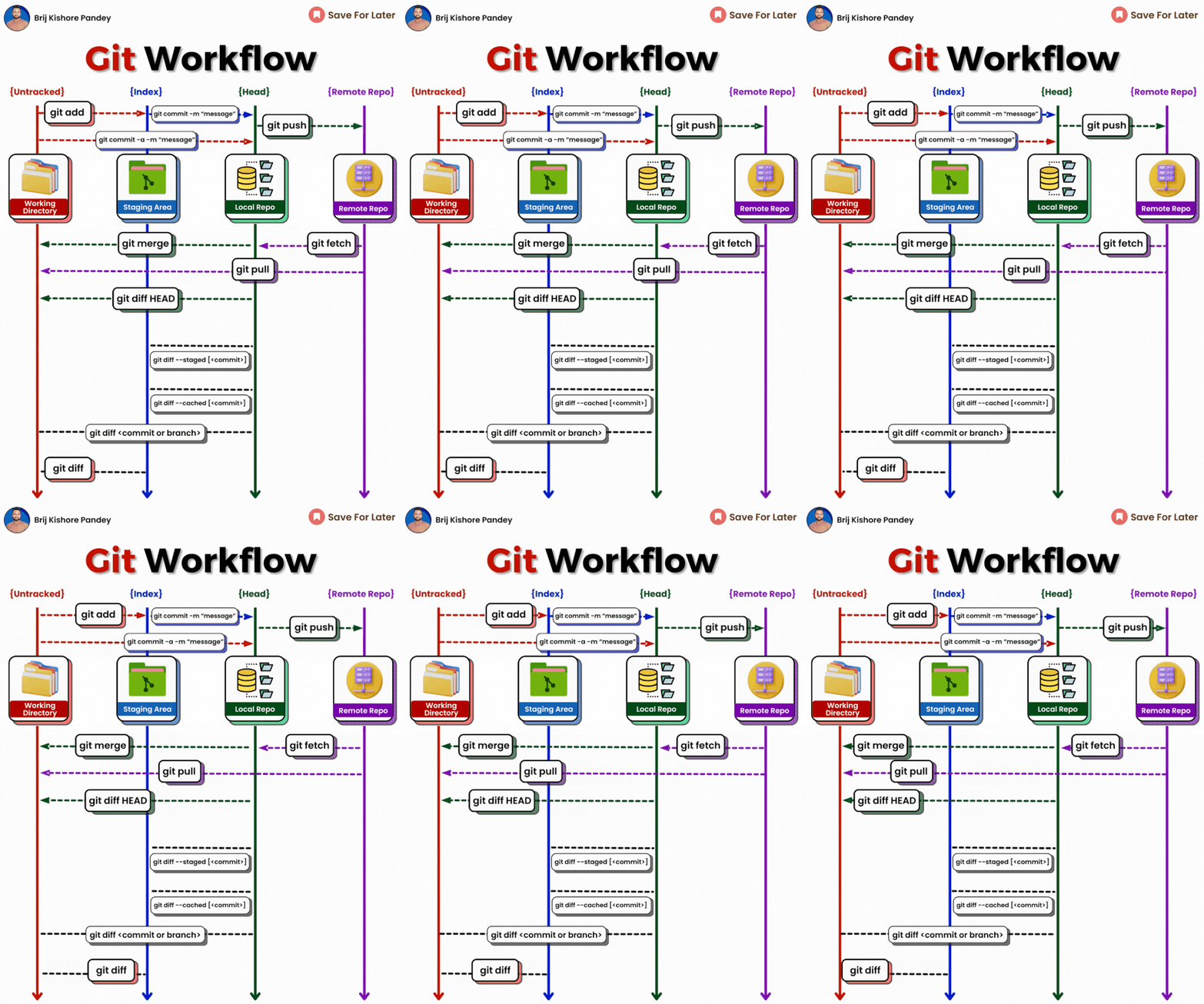
𝗴𝗶𝘁 𝗱𝗶𝗳𝗳: Show file differences not yet staged.𝗴𝗶𝘁 𝗰𝗼𝗺𝗺𝗶𝘁-𝗮 -𝗺 "𝗰𝗼𝗺𝗺𝗶𝘁 𝗺𝗲𝘀𝘀𝗮𝗴𝗲": Commit all tracked changes with a message.𝗴𝗶𝘁 𝘀𝘁𝗮𝘁𝘂𝘀: Show the state of your working directory.𝗴𝗶𝘁 𝗮𝗱𝗱𝗳𝗶𝗹𝗲_𝗽𝗮𝘁𝗵:Add file(s) to the staging area.𝗴𝗶𝘁 𝗰𝗵𝗲𝗰𝗸𝗼𝘂𝘁-𝗯 𝗯𝗿𝗮𝗻𝗰𝗵_𝗻𝗮𝗺𝗲: Create and switch to a new branch.𝗴𝗶𝘁 𝗰𝗵𝗲𝗰𝗸𝗼𝘂𝘁𝗯𝗿𝗮𝗻𝗰𝗵_𝗻𝗮𝗺𝗲: Switch to an existing branch.𝗴𝗶𝘁 𝗰𝗼𝗺𝗺𝗶𝘁–𝗮𝗺𝗲𝗻𝗱:Modify the last commit.𝗴𝗶𝘁 𝗽𝘂𝘀𝗵𝗼𝗿𝗶𝗴𝗶𝗻 𝗯𝗿𝗮𝗻𝗰𝗵_𝗻𝗮𝗺𝗲: Push a branch to a remote.𝗴𝗶𝘁 𝗽𝘂𝗹𝗹: Fetch and merge remote changes.𝗴𝗶𝘁 𝗿𝗲𝗯𝗮𝘀𝗲-𝗶: Rebase interactively, rewrite commit history.𝗴𝗶𝘁 𝗰𝗹𝗼𝗻𝗲: Create a local copy of a remote repo.𝗴𝗶𝘁 𝗺𝗲𝗿𝗴𝗲: Merge branches together.𝗴𝗶𝘁 𝗹𝗼𝗴–𝘀𝘁𝗮𝘁: Show commit logs with stats.𝗴𝗶𝘁 𝘀𝘁𝗮𝘀𝗵: Stash changes for later.𝗴𝗶𝘁 𝘀𝘁𝗮𝘀𝗵𝗽𝗼𝗽: Apply and remove stashed changes.𝗴𝗶𝘁 𝘀𝗵𝗼𝘄𝗰𝗼𝗺𝗺𝗶𝘁_𝗶𝗱: Show details about a commit.𝗴𝗶𝘁 𝗿𝗲𝘀𝗲𝘁𝗛𝗘𝗔𝗗~𝟭: Undo the last commit, preserving changes locally.𝗴𝗶𝘁 𝗳𝗼𝗿𝗺𝗮𝘁-𝗽𝗮𝘁𝗰𝗵 -𝟭 𝗰𝗼𝗺𝗺𝗶𝘁_𝗶𝗱: Create a patch file for a specific commit.𝗴𝗶𝘁 𝗮𝗽𝗽𝗹𝘆𝗽𝗮𝘁𝗰𝗵_𝗳𝗶𝗹𝗲_𝗻𝗮𝗺𝗲: Apply changes from a patch file.𝗴𝗶𝘁 𝗯𝗿𝗮𝗻𝗰𝗵-𝗗 𝗯𝗿𝗮𝗻𝗰𝗵_𝗻𝗮𝗺𝗲: Delete a branch forcefully.𝗴𝗶𝘁 𝗿𝗲𝘀𝗲𝘁: Undo commits by moving branch reference.𝗴𝗶𝘁 𝗿𝗲𝘃𝗲𝗿𝘁: Undo commits by creating a new commit.𝗴𝗶𝘁 𝗰𝗵𝗲𝗿𝗿𝘆-𝗽𝗶𝗰𝗸 𝗰𝗼𝗺𝗺𝗶𝘁_𝗶𝗱: Apply changes from a specific commit.𝗴𝗶𝘁 𝗯𝗿𝗮𝗻𝗰𝗵: Lists branches.𝗴𝗶𝘁 𝗿𝗲𝘀𝗲𝘁 --𝗵𝗮𝗿𝗱: Resets everything to a previous commit, erasing all uncommitted changes
小技巧
在所有提交中查找某个关键字:
git grep "近亲" $(git rev-list --all .)6 - Latency Numbers Every Programmer Should Know
在线预览地址:Latency Numbers Every Programmer Should Know
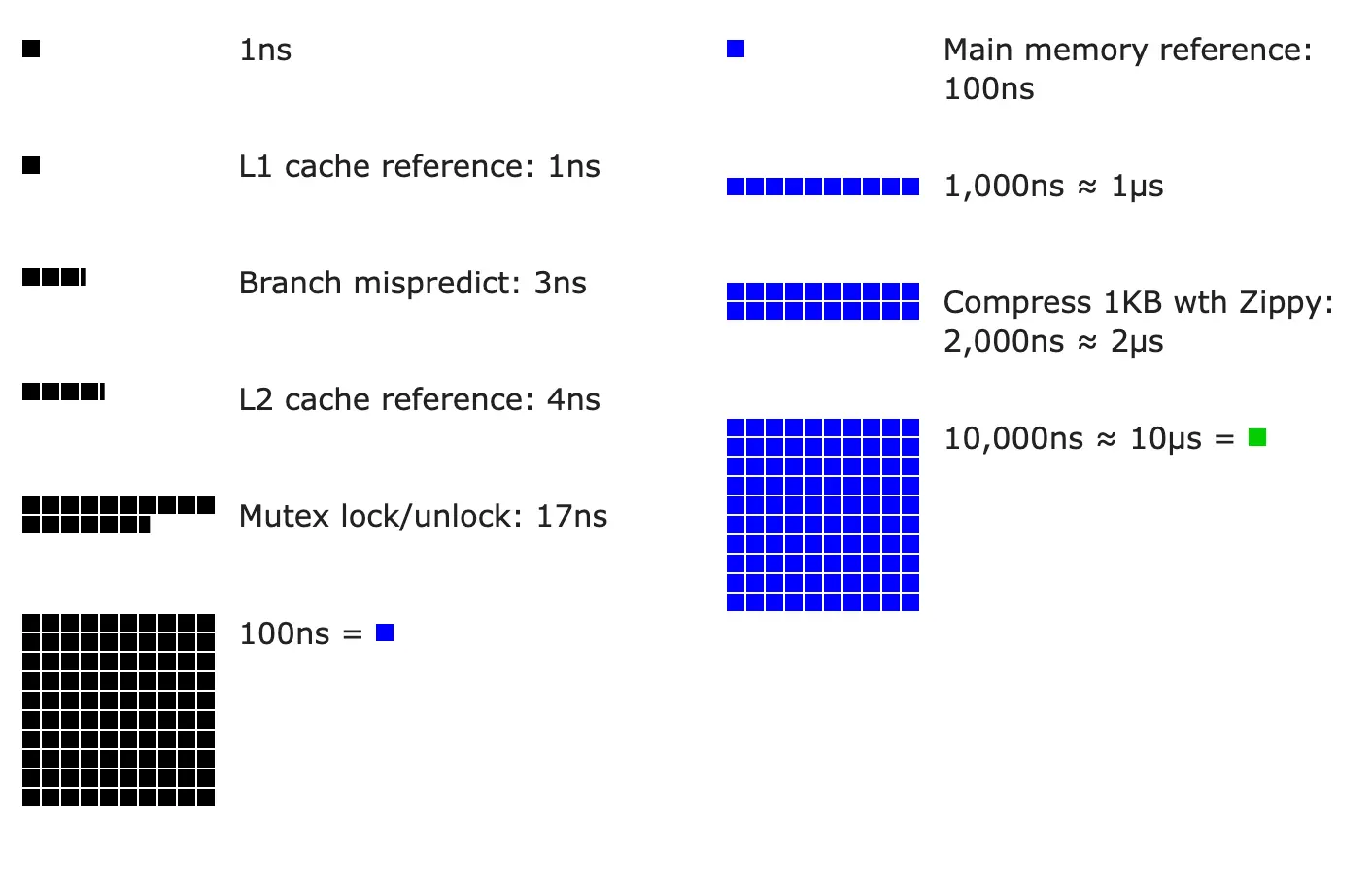
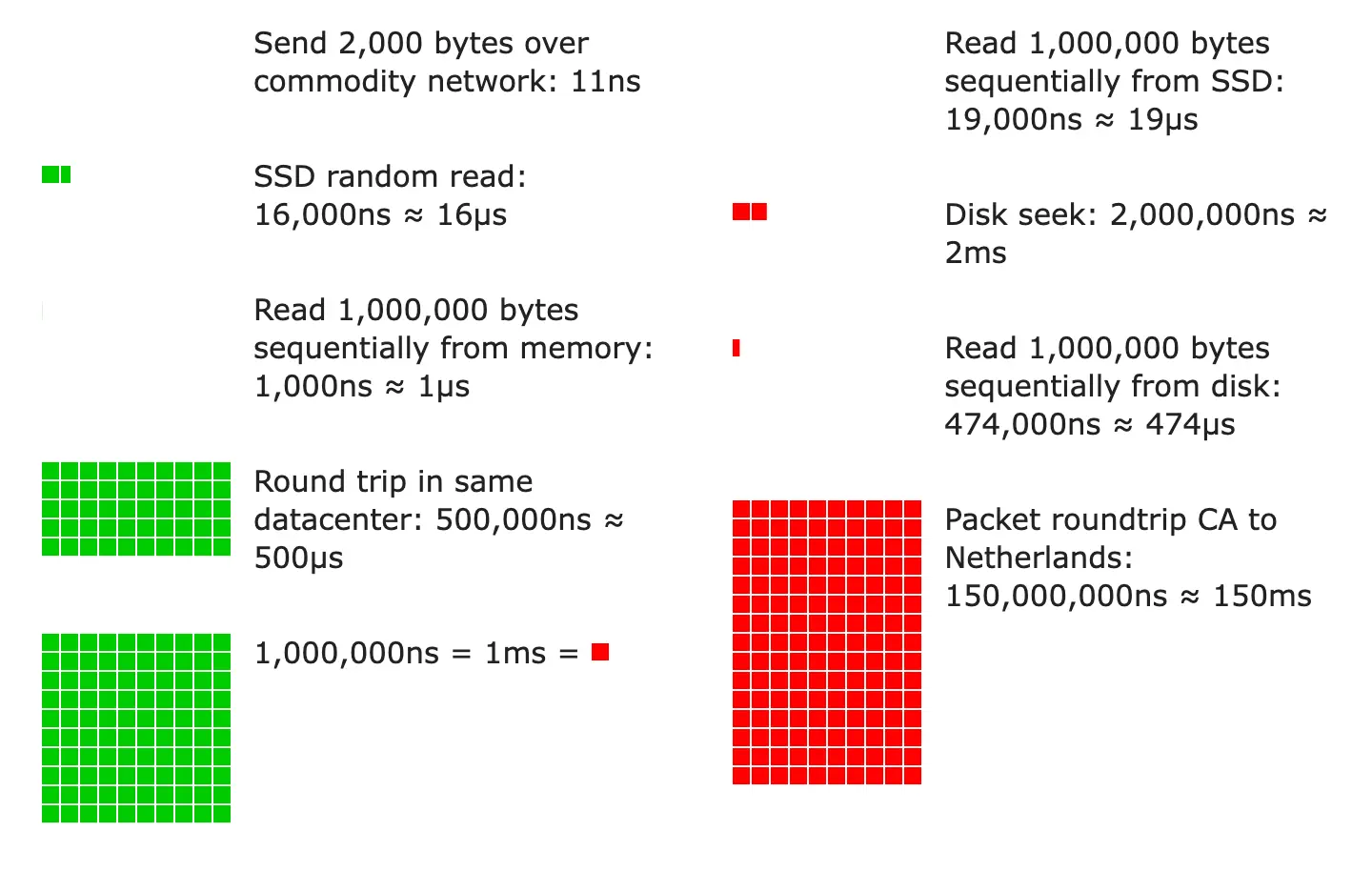
From Google SRE book
| Operation | Time in ns | Time in ms (1ms = 1,000,000 ns) |
|---|---|---|
| L1 cache reference | 1 | |
| Branch misprediction | 3 | |
| L2 cache reference | 4 | |
| Mutex lock/unlock | 17 | |
| Main memory reference | 100 | |
| Compress 1 kB with Zippy | 2,000 | 0.002 |
| Read 1 MB sequentially from memory | 10,000 | 0.010 |
| Send 2 kB over 10 Gbps network | 1,600 | 0.0016 |
| SSD 4kB Random Read | 20,000 | 0.020 |
| Read 1 MB sequentially from SSD | 1,000,000 | 1 |
| Round trip within same datacenter | 500,000 | 0.5 |
| Read 1 MB sequentially from disk | 5,000,000 | 5 |
| Read 1 MB sequentially from 1Gbps network | 10,000,000 | 10 |
| Disk seek | 10,000,000 | 10 |
| TCP packet round trip between continents | 150,000,000 | 150 |
Therefore, it is possible to read:
- sequentially from HDD at a rate of ~200MB per second
- sequentially from SSD at a rate of ~1 GB per second
- sequentially from main memory at a rate of ~100GB per second (burst rate)
- sequentially from 10Gbps Ethernet at a rate of ~1000MB per second
Back of the Envelope Calculations
Quick tips: Use numbers based on the decimal system to run numbers in your head. Sample calculation:
- What is the overall latency of retrieving 30 256kB images from one server?
Naïve design: do all the work on one machine - dominated by disk seek time.
| Reads required to generate page | 30 images / 2 disks per machine = 15 |
| Time to read one image from HDD | (256KB / 1MB) * 5 ms + 10 ms seek = 11.28 ms |
| Approximate time to generate results | 15 reads * 11.28 ms = 169.2 ms |
One HDD-based server can generate 1000 ms / 169.2 ms ~= 5 result pages per second.
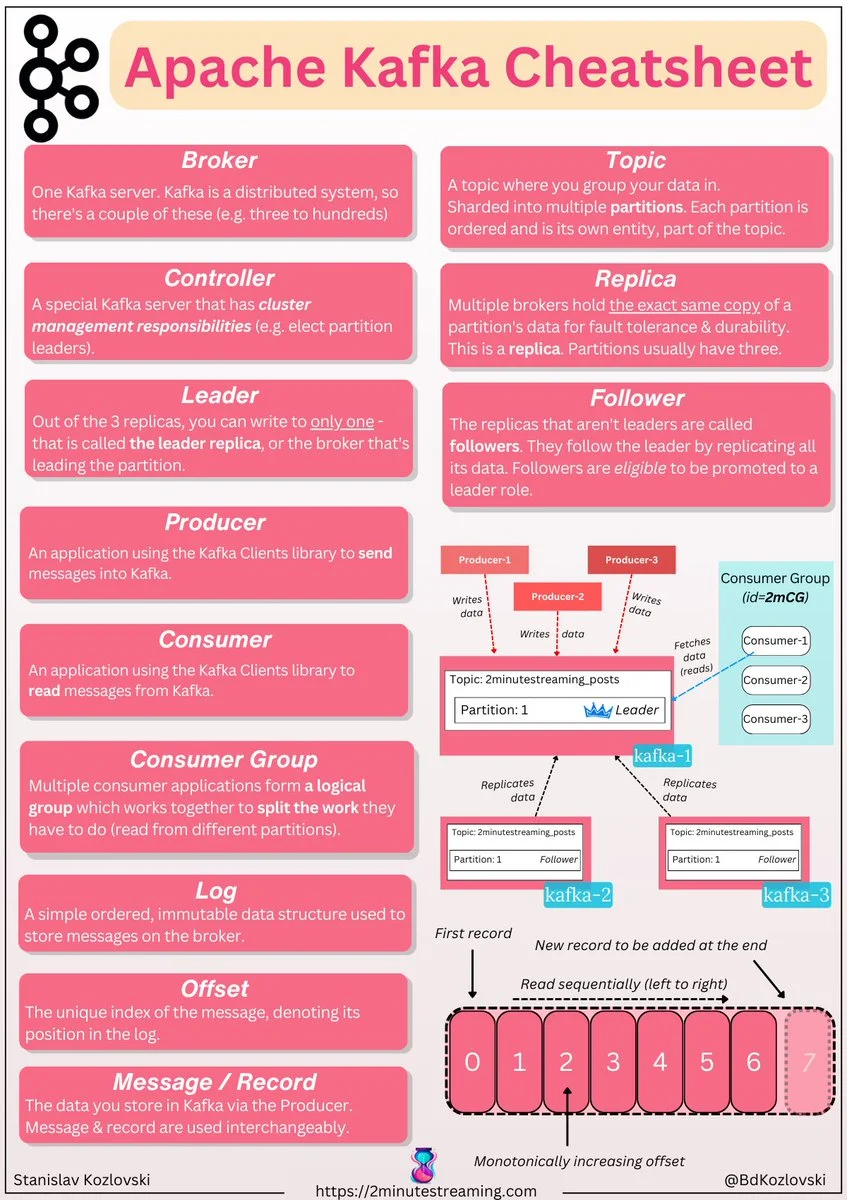
7 - Kafka
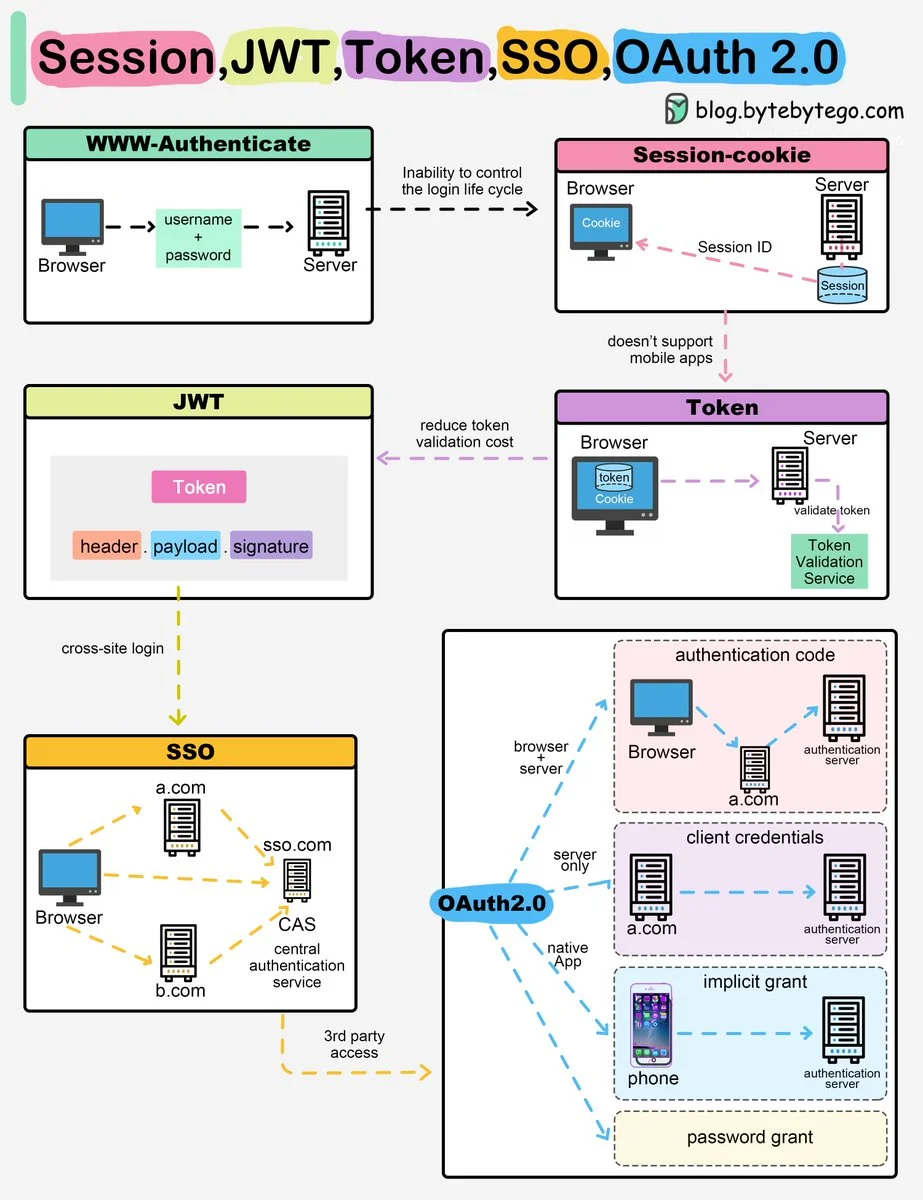
8 - Web authorization
9 - Memory allocation