Git
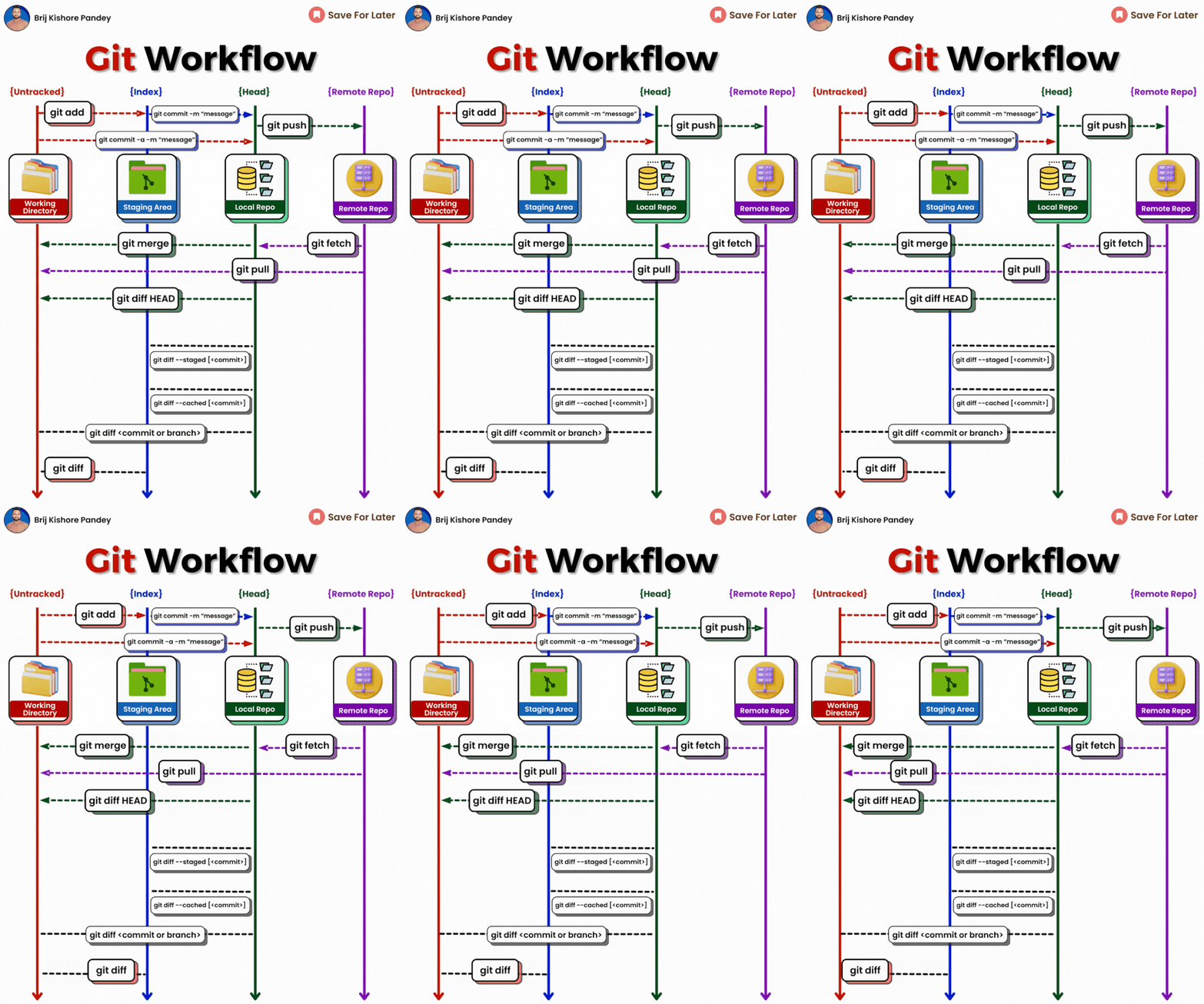
𝗴𝗶𝘁 𝗱𝗶𝗳𝗳: Show file differences not yet staged.𝗴𝗶𝘁 𝗰𝗼𝗺𝗺𝗶𝘁-𝗮 -𝗺 "𝗰𝗼𝗺𝗺𝗶𝘁 𝗺𝗲𝘀𝘀𝗮𝗴𝗲": Commit all tracked changes with a message.𝗴𝗶𝘁 𝘀𝘁𝗮𝘁𝘂𝘀: Show the state of your working directory.𝗴𝗶𝘁 𝗮𝗱𝗱𝗳𝗶𝗹𝗲_𝗽𝗮𝘁𝗵:Add file(s) to the staging area.𝗴𝗶𝘁 𝗰𝗵𝗲𝗰𝗸𝗼𝘂𝘁-𝗯 𝗯𝗿𝗮𝗻𝗰𝗵_𝗻𝗮𝗺𝗲: Create and switch to a new branch.𝗴𝗶𝘁 𝗰𝗵𝗲𝗰𝗸𝗼𝘂𝘁𝗯𝗿𝗮𝗻𝗰𝗵_𝗻𝗮𝗺𝗲: Switch to an existing branch.𝗴𝗶𝘁 𝗰𝗼𝗺𝗺𝗶𝘁–𝗮𝗺𝗲𝗻𝗱:Modify the last commit.𝗴𝗶𝘁 𝗽𝘂𝘀𝗵𝗼𝗿𝗶𝗴𝗶𝗻 𝗯𝗿𝗮𝗻𝗰𝗵_𝗻𝗮𝗺𝗲: Push a branch to a remote.𝗴𝗶𝘁 𝗽𝘂𝗹𝗹: Fetch and merge remote changes.𝗴𝗶𝘁 𝗿𝗲𝗯𝗮𝘀𝗲-𝗶: Rebase interactively, rewrite commit history.𝗴𝗶𝘁 𝗰𝗹𝗼𝗻𝗲: Create a local copy of a remote repo.𝗴𝗶𝘁 𝗺𝗲𝗿𝗴𝗲: Merge branches together.𝗴𝗶𝘁 𝗹𝗼𝗴–𝘀𝘁𝗮𝘁: Show commit logs with stats.𝗴𝗶𝘁 𝘀𝘁𝗮𝘀𝗵: Stash changes for later.𝗴𝗶𝘁 𝘀𝘁𝗮𝘀𝗵𝗽𝗼𝗽: Apply and remove stashed changes.𝗴𝗶𝘁 𝘀𝗵𝗼𝘄𝗰𝗼𝗺𝗺𝗶𝘁_𝗶𝗱: Show details about a commit.𝗴𝗶𝘁 𝗿𝗲𝘀𝗲𝘁𝗛𝗘𝗔𝗗~𝟭: Undo the last commit, preserving changes locally.𝗴𝗶𝘁 𝗳𝗼𝗿𝗺𝗮𝘁-𝗽𝗮𝘁𝗰𝗵 -𝟭 𝗰𝗼𝗺𝗺𝗶𝘁_𝗶𝗱: Create a patch file for a specific commit.𝗴𝗶𝘁 𝗮𝗽𝗽𝗹𝘆𝗽𝗮𝘁𝗰𝗵_𝗳𝗶𝗹𝗲_𝗻𝗮𝗺𝗲: Apply changes from a patch file.𝗴𝗶𝘁 𝗯𝗿𝗮𝗻𝗰𝗵-𝗗 𝗯𝗿𝗮𝗻𝗰𝗵_𝗻𝗮𝗺𝗲: Delete a branch forcefully.𝗴𝗶𝘁 𝗿𝗲𝘀𝗲𝘁: Undo commits by moving branch reference.𝗴𝗶𝘁 𝗿𝗲𝘃𝗲𝗿𝘁: Undo commits by creating a new commit.𝗴𝗶𝘁 𝗰𝗵𝗲𝗿𝗿𝘆-𝗽𝗶𝗰𝗸 𝗰𝗼𝗺𝗺𝗶𝘁_𝗶𝗱: Apply changes from a specific commit.𝗴𝗶𝘁 𝗯𝗿𝗮𝗻𝗰𝗵: Lists branches.𝗴𝗶𝘁 𝗿𝗲𝘀𝗲𝘁 --𝗵𝗮𝗿𝗱: Resets everything to a previous commit, erasing all uncommitted changes
小技巧
在所有提交中查找某个关键字:
git grep "近亲" $(git rev-list --all .)